


Wingstop
4.831.91K Reviews
App Specs
- Version
- 2026.8.0
- Updated On
- License
- Free
- Downloads
- 5,000,000+
- Developer
- Wingstop Restaurants, Incorporated
- Categories
- Food & Drink
- Platform
- Android, iOS
Screenshots
 Analysis by AppCompare
When I want wings without turning dinner into a planning project, I care about a few practical things: can I browse the menu at my own pace, shape an order around different tastes, and choose a way to get it that fits the evening? That is the lens I use for the Wingstop app. It is a free Food & Drink app from Wingstop Restaurants, Incorporated, built around ordering the chain’s food for pickup or delivery. It makes most sense when Wingstop is already what you want; it is less compelling if your main goal is to compare lots of restaurants or find the broadest possible meal selection.
Who will get the most from ordering this way
I would recommend it first to people who order from Wingstop more than once in a while, especially anyone who likes to decide on flavors, sides, and dips before reaching the counter. Browsing on a phone gives you a little breathing room to think through the combination instead of making choices while hungry and in a hurry. It can also help when one person wants a familiar order and another wants to try something different.
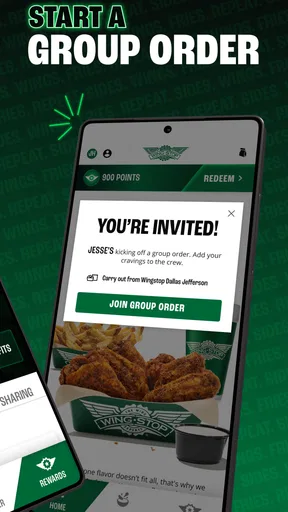
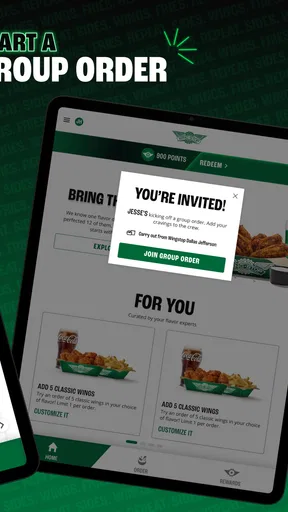
A realistic use case is a weeknight when friends are coming over and nobody agrees on a single flavor. I can look through the choices, build an order with more than one preference in mind, and select pickup or delivery according to the evening’s plans. That does not guarantee a particular arrival time or solve every group-order headache, but it gives me one place to organize the decision rather than relaying everyone’s requests through a phone call.
What to check before you commit
Before building a large order, I would confirm the location and the handoff option shown in the app, then review the basket carefully. Pickup and delivery are useful choices, but they suit different circumstances: pickup gives me more control over when I collect the food, while delivery saves a trip when staying home matters more. I would not assume that every location has identical availability or that delivery is automatically the better value; the right choice depends on what the app offers for the address and order I enter.
For a mixed group, my practical tip is to settle the broad preferences first: who wants heat, who prefers a milder choice, and which sides or dips need to be included. Then use the menu to check the individual items and review the finished order before sending it. This small pause is more useful than rushing through customization, particularly when the order includes several combinations. If someone has a dietary concern, I would check the item information carefully and ask the restaurant directly when an ingredient question needs a definitive answer.
How it compares with other ways to order
The main alternative is ordering directly at a Wingstop location or by phone. Those options can be more comfortable if you would rather talk through a special request with staff, but browsing in the app lets you consider the menu without holding up a queue or trying to remember every choice during a call. For a familiar repeat order, saving favorites can reduce the steps; for an unusual request, I would choose the channel that makes it easiest to communicate clearly.
Restaurant-discovery and delivery apps serve a different purpose. They can be more useful when I have not decided what kind of food I want, or when I want to compare restaurants in one place. Wingstop’s own app is narrower by design: it is for someone who has already chosen this restaurant and wants a direct route to its menu and ordering flow. That focus is a strength when the craving is specific, but it is not a substitute for browsing across a neighborhood’s dining options.
Worth Reading Before You Choose

Flipboard Shows What News Apps Must Do Beyond the Feed

Switching to Android Auto Means Rethinking Your Driving Routine

Google Calendar Makes a Crowded Week Easier to Manage

Ludo King Makes the Most of the Minutes Between Plans

Baby Panda World Brings Quick Play to Modern Phones, but Its Game Library Feels Busy

ESPN’s Live Game View Makes Following Close Games Easier
The small trade-offs that affect everyday use
Using a restaurant-specific app means adding another account and ordering routine to my phone, so it is worth it only if I expect to use it. I would not install it for a one-off meal if I am comfortable ordering in person and do not need to browse ahead. On the other hand, if I return to the same flavors, the saved-order option described in the app can make repeat visits less fussy. I would still scan the basket each time rather than treating a previous order as automatically right for a different group or occasion.
The app’s practical value also depends on the situation around the food. If I am already near a restaurant, pickup may be the straightforward choice; if I am staying in, delivery may be more convenient. Either way, the app is a way to place an order, not a reason to assume that timing, item availability, or the best handoff choice will be identical every time. I find it useful to make those decisions with the current order in front of me instead of relying on what worked on another day.
Getting Started with the App
First things first, downloading the app was a breeze. It’s available on both Android and iOS, so no one’s left out. Once installed, I was greeted with a sleek design that immediately made my taste buds tingle. The interface is pretty intuitive, making navigation easy even if you’re not the most tech-savvy person. It is rated for Everyone, has been around since 2011, and its current version is 2026.5.1; its Android minimum is version 7.0. Those details make it accessible to many phone users, though I would still check compatibility on an older device before relying on it for a time-sensitive meal.
Signing up was straightforward. You can either create a new account or log in with your existing credentials. I chose the latter option, and within seconds, I was exploring the vast array of wing flavors and sides. The app does a great job of showcasing everything Wingstop has to offer without overwhelming you. If you are ordering for the first time, I would take a moment to browse before adding items; that makes it easier to see how the meal comes together rather than building a basket one craving at a time.
Exploring the Menu
If you’re a fan of variety, you’ll love the app’s menu section. The wings are the star of the show, obviously, but the app also highlights the delicious sides and drinks that can complement your meal. Each item comes with a description, and surprisingly, even the calorie count, which I found to be quite considerate for those watching their diet. I would use those details to compare choices, not as a substitute for checking whether a particular item fits a specific dietary need.
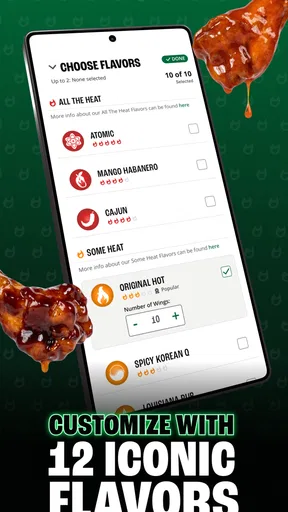
I was able to easily customize my order. Whether you want extra spicy or prefer something on the milder side, the app’s got you covered. You can mix and match your flavors, and even choose the type of dip you want. Personally, I went for the classic lemon pepper wings with a side of seasoned fries and ranch dip. Yum! For a shared meal, I would decide on flavor combinations before checkout and make sure each choice is represented clearly in the basket. It is a simple way to avoid discovering too late that everyone assumed someone else had ordered the dip.
Placing an Order
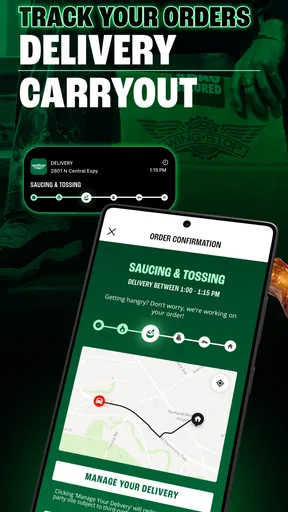
Once you’ve made your selection, placing an order is pretty much a piece of cake. The app guides you through the process, and I appreciated the fact that it kept me updated on my order’s status. You can choose between pickup or delivery, whichever suits your needs. I decided to go for delivery because, let’s face it, sometimes you just want to chill at home with a bucket of wings. For a meal tied to a firm schedule, I would leave enough flexibility for the chosen handoff rather than assuming an app update can remove every uncertainty.
The app also allows you to save your favorite orders, which is a neat feature if you’re a repeat offender like me. It makes reordering incredibly convenient, so you can get your wing fix even faster the next time around. I see that as a shortcut, not a reason to skip the final review: a saved combination that suited a solo dinner may need adjusting for a group, and a quick check of the selected items helps catch that before placing the order.
User Experience and Functionality
In terms of functionality, the app is pretty solid. It runs smoothly without any noticeable glitches or crashes, at least during my experience. The developers seem to have paid attention to the little details that enhance user experience. I particularly liked the search feature, which lets you quickly find specific items or stores near you. If I already know what I am looking for, search saves me from browsing every menu section; if I am undecided, browsing still works better because it gives me the wider picture.
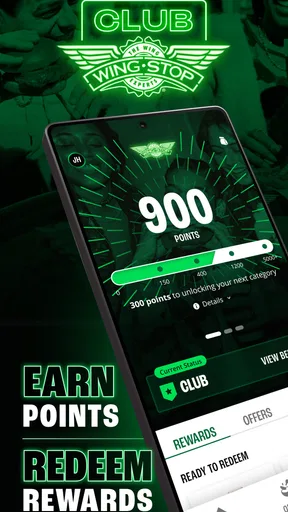
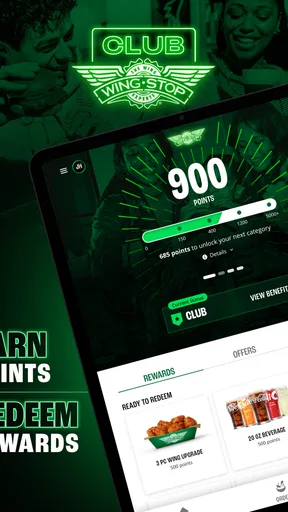
Another nice touch is the rewards program integrated into the app. Who doesn’t love earning points with every purchase? It’s definitely a smart way to keep customers coming back for more. Plus, the occasional promo or discount notification is always a welcome surprise. I would treat rewards and promotions as a bonus rather than the whole reason to order, and check the details shown at the time so I know what applies to the basket I am placing.
Final Thoughts
Overall, the Wingstop app is a must-have for any wing lover. It combines convenience with a user-friendly design, making it easier than ever to enjoy your favorite flavors. Whether you’re planning a party or just treating yourself to a solo feast, this app makes the whole process seamless and enjoyable. Its popularity is substantial, with an average rating of 4.8 from around 189,000 ratings and more than 5 million installs. That helps explain why it is a familiar ordering option, though popularity cannot tell me whether a particular location or order will suit my plans.
So, if you haven’t already, give it a try. Your taste buds will thank you, and who knows, you might just find yourself using it more often than you’d like to admit! I would pick it when I know I want Wingstop and value browsing, customization, and a saved route back to a favorite meal. If I am undecided about dinner, want to compare several restaurants, or need to discuss a complicated request directly, I would use a broader ordering option or speak with the restaurant instead. For the right kind of craving, this app keeps the choice focused and the ordering process comfortably simple.
Pros
- Intuitive user interface makes ordering easy.
- Wide variety of flavors to choose from.
- Real-time order tracking available.
- Customizable meal options for preferences.
- Frequent updates with new features.
Cons
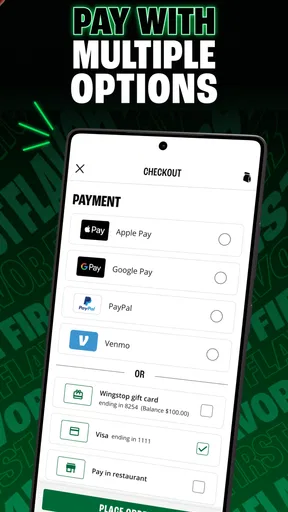
- Limited payment options available.
- Inconsistent app performance occasionally.
- Requires account creation to order.
- Push notifications can be overwhelming.
- Lacks a loyalty rewards program.
FAQs for Wingstop
What is Wingstop's primary function?
Wingstop is a fast-food app designed to streamline the process of ordering their renowned chicken wings and sides. Users can browse the menu, customize their orders, and choose between delivery or pickup options. The app also offers exclusive deals and promotions, making it a convenient tool for wing lovers.
Is Wingstop available on both Android and iOS devices?
Yes, the Wingstop app is available for download on both Android and iOS platforms. Users can find it on the Google Play Store for Android devices and the Apple App Store for iOS devices, ensuring a wide range of smartphone users can access its features.
Does Wingstop offer any loyalty or rewards program through the app?
Wingstop's app includes a rewards program where users can earn points with every purchase. These points can be redeemed for free food items or discounts on future orders. The app makes tracking points and rewards easy, enhancing the overall dining experience for frequent customers.
Can I customize my order using the Wingstop app?
Absolutely. The Wingstop app allows for full customization of orders, including choosing wing flavors, adjusting spice levels, and selecting sides. Users can also specify any dietary preferences or allergies, ensuring a personalized dining experience tailored to individual tastes and needs.
Are there any exclusive deals available through the Wingstop app?
Yes, the Wingstop app often features exclusive deals and promotions that are not available through other ordering methods. By using the app, customers can access special discounts, limited-time offers, and app-only meal bundles, providing added value and savings on their favorite meals.


